Razer Joro
Keyboard firmware RE, custom keymap software, and a dongle pairing tool.
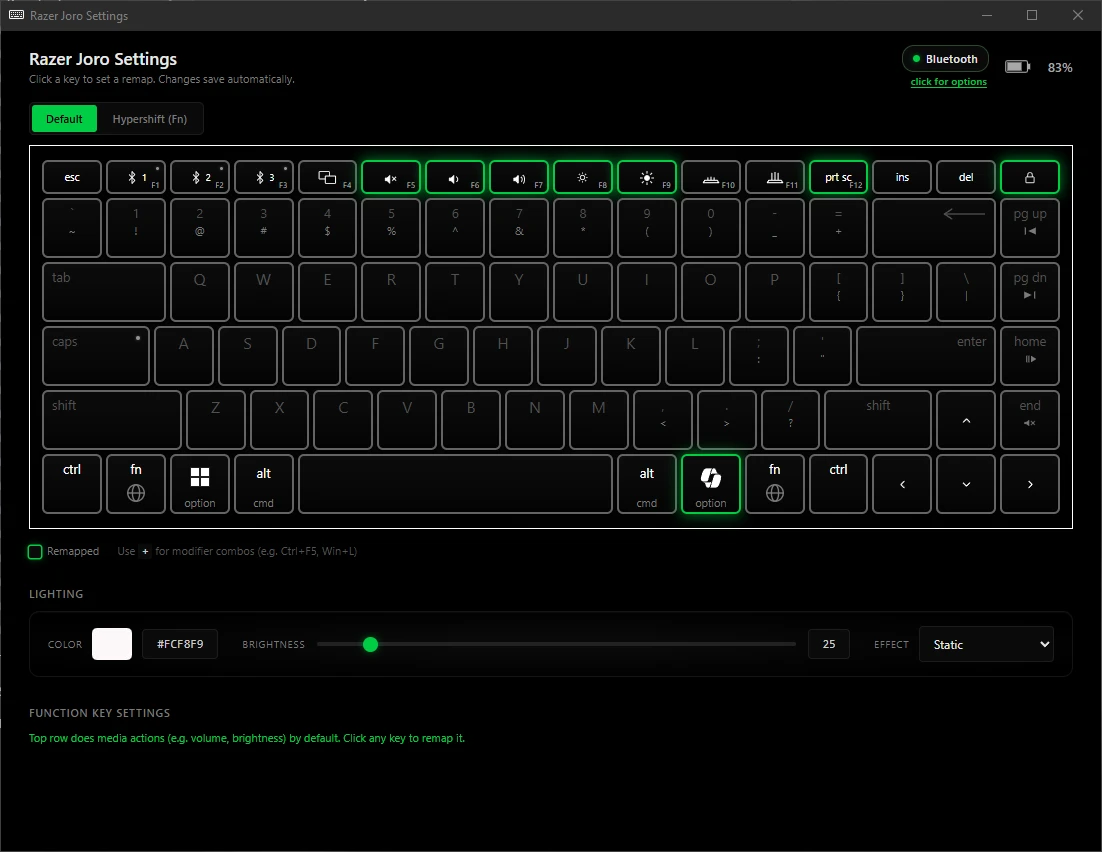
- HIGH LEVEL SUMMARY. I loved the keyboard hardware, but poor UX choices by Razer drove me to reverse engineer the FW and SW stack using XYZ tools/methods. The outcome: Razer Synapse is completely replaced by my own custom FW + Rust daemon that removs the keybaord sleep (to make it always responsive), enables previously FW-locked keyremaps, and allows you to set truly ANY keyremap, etc.
- fan of low profile kbs, wanted somethign nice and alu framed, but compact size (lives on my HW workbench; cant have huge keyboard real estate when I’m switching from typing to soldering/assembling things), like an apple keyboard but black. apple went plastic; feels cheap. also cant deal with the mac-specific keys/shortcuts on win10. was using old $20 practically disposable compact ones. cheap key feel and wears out too quick. also have trained YEARS for instinctive keypresses (fn+arrows for home / end; delete key where LOCK key is on razer)
- synapse: universally regarded as a scourge. BLOATED AS HELL. always wants updates. has 100x the features I need (simple remap). absolute shitware.
- START WITH WHY
- -diff from synapse keymaps (what we unlocked, how we are better) — now truly, any key can be any shortcut, FUCKING MONTHS OF SUPPORT HISTORY WITH RAZER SUPPORT, THEY STILL HAVENT SOLVED IT. the BLE MAPPING. I WANT F2 to make F2, NOT SWITCH BLE MODES, which was impossible on native razer stack in wireless mode (only in usb mode iirc). show screenshots of razer support / support case history / multiple cases.
- more nags / why: fuckign BLE sleep latency OMFG. type three fuckign words before it picks up from deep sleep, and zero transparency around sleep mechanics on native. if your keyboard randomly deep sleeps during task switching (typing for five minutes, then soldering five mins, then back to typing) took 5 whole EXRUCIATING seconds to register keypresses…well, what would you do? probably chuck it. I nearly did. I got mad and then got to work. I believed its firmware was encrypted for months (umm..idk about this. maybe a couple weeks). It was plaintext; my extractor was off by one.
- With the firmware readable, a 2-byte patch (
cmp r0,#1→b.n) eliminated the lag when it wakes over Bluetooth. - probably the most impressive claude session ever. multiple false starts etc
- weeks of work. initially claude said impossible about multiple things.
- outline all the methods we tried: ble ctl, MITM, caps, etc etc.
- figure out waht model we used; do transcripts survive? hopefully?
- literally getting a blood panel, in the waiting room at X, talking to claude about hacking this kb and BAM. we got it.
- truly a collaboration / thinking partner. neither of us had it alone. not even close to one-shot. still get some rare misfires with the whole elevated win+ shortcuts, but pretty damn stable. battery state, charging, full remaps incl key combos — the works. clean, minimal and intuitive visual UI. WYSIWYG.
- TRUE FW RE: flashed custom.
- A Synapse-free daemon handles keymaps, and pairing a $5 HyperSpeed dongle no longer needs a Razer mouse.(detail the NONSENSE about needing a mouse to set up dongle mode with Razer official FW/SW stack, then never turn on mouse again? WTF? who is building this shitty SW? )
- It’s an nRF52 running Nordic’s SoftDevice underneath.
expository voice to text draft:
The 2007 generation of the Apple wireless keyboard. the compact version was awesome and something I always loved using even as a Windows user. it was a project back then getting it to work with Windows but I did it.
the new magic keyboard has a way slicker profile and it looks sexy but it honestly feels cheap. thin plastic on the back. it’s too light and too thin. for a keyboard. hard to say too light until then but yes for a keyboard very possible. I gave it a try but also probably more unforgiving are the arrow keys. for a 75% compact keyboard layout, I must have full size arrow keys. on a keyboard man I use arrow keys for nav all the time. back in 2007. much less so. but now I live in a terminal.
The full size Apple magic keyboard would probably do it for me, but I can’t use full size. it just takes up too much dust space. because my desk is not just a computer workstation, it is also hardware. I’m constantly shoving the keyboard aside to make room on my anti-static mat for assemblies probing various hardware activity.
enter the Razer joro. describe it. specs.
Bluetooth and wireless. 75% compact layout with full size arrow keys, full size home and end buttons. aluminum frame. unfortunately, plastic bottom shell. but it feels solid enough, nice and compact but not razor thin. and best of all, black.
personally, I prefer 2.4 GHz simplicity and reliability. zero possibility of Bluetooth connection issues.
it is possible with what Razer describes as…(hyperspeed xyz some weird term)
but in order to make the switch and connect your keyboard, there’s a circuitous software step and it has the hard requirement of actually pairing a mouse. so if you want to use this keyboard with a 2.4 GHz connection, you have to buy a $40 mouse that you don’t want, instead of simply buying a $3 dongle that is widely available on eBay.
f1-f3 keys are eaten.
honestly, who has three devices that they switch the keyboard around to?. I have a Windows and a Mac development machine. but forcing the user to forgo these three keys on a compact keyboard layout. bad move.